


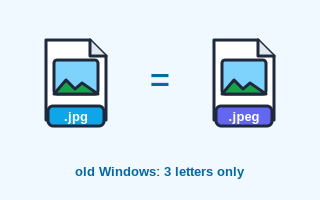
JPG or JPEG? The same thing
A .jpg file and a .jpeg file are the same kind of picture. The three-letter .jpg is a leftover from MS-DOS and older versions of Windows, which allowed file extensions of only three letters.
Source: Adobe
Run it. Get results.
No tool matches that. Try another word.
Mathematics
Mathematics
Utilities
Utilities
Image
Image
Language
Language
Networking
Networking
Finance
Finance
Cybersecurity
Cybersecurity
Text
Text
Date
Date
Measurement
Measurement
Audio
Audio
Health
Health
Nutrition
Nutrition
Time
Time
Weather
Weather
Document Processing
Document Processing
Productivity
Productivity
Career
Career
Business
Business
Video
Video
Education
Education
Statistics
Statistics
Chemistry
Chemistry
Physics
Physics
Construction
Construction
Electrical Engineering
Electrical Engineering
Programming
Programming
Graphic Design
Graphic Design
Computer Science
Computer Science
Database
Database
Music
Music
Digital Electronics
Digital Electronics
Electronics Engineering
Electronics Engineering
A free JPG to PDF converter that turns photos and pictures into one PDF, one picture per page. Put the pages in order, turn any that are sideways, and choose A4, US Letter or pages the shape of each picture. It all happens in your browser: your pictures are never uploaded, which makes it safe for IDs, receipts and signed forms.
No. The PDF is made in your browser, on your own computer. Your pictures are never sent to Toolulu or anyone else, which also makes it safe for private documents.
JPG (JPEG) and PNG work everywhere. WebP, GIF and BMP work in all modern browsers, and HEIC photos from iPhones work where the browser can read them, such as Safari.
No for most photos: a JPG that is already the right way up goes into the PDF exactly as it is, without being compressed again. Pictures that need turning, and other formats, are saved again as high-quality JPEG, or PNG for PNGs, so transparency is kept.
Phones often save a photo as the camera sensor saw it and add a note (the EXIF orientation) saying which way is up. Apps that ignore the note show it sideways. This converter reads the note, and you can still turn any page by hand.
Up to 100 pictures and 250 MB at a time. For a very large PDF, make it in parts, then join them.
Not yet: each page is a picture, so text in it can't be searched or copied. That needs text recognition (OCR).
A .jpg file and a .jpeg file are the same kind of picture. The three-letter .jpg is a leftover from MS-DOS and older versions of Windows, which allowed file extensions of only three letters.
Source: Adobe
The JPEG standard your phone's photos use, ISO/IEC 10918, was created in 1992. More than thirty years later it is still the most widely used format for still pictures.
Source: jpeg.org
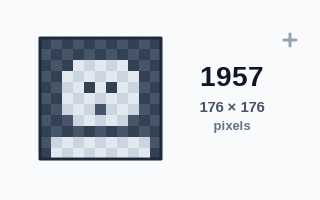
In 1957 Russell Kirsch, at the US National Bureau of Standards (now NIST), scanned a photo of his three-month-old son Walden into a computer. It was the first digital image, only 176 pixels on a side: a 12-megapixel phone photo has nearly 400 times as many pixels.
Source: nist.gov
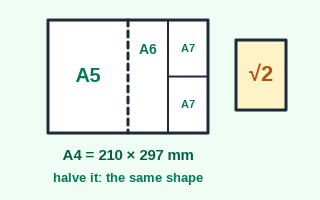
A-sizes are built on the square root of 2: cut a sheet in half across its long side and both halves have the same shape as the sheet. A0 is one square metre, A4 is 210 by 297 mm, and halving it gives A5. US offices use Letter instead, 216 by 279 mm, which is why this tool offers both.
Source: cl.cam.ac.uk
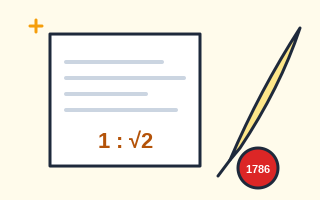
One of the oldest records of paper in the ratio 1 to √2 is a letter written on 25 October 1786 by the German physics professor Georg Christoph Lichtenberg. Walter Porstmann later turned the idea into the German standard DIN 476 in 1922, the basis of A4.
Source: cl.cam.ac.uk
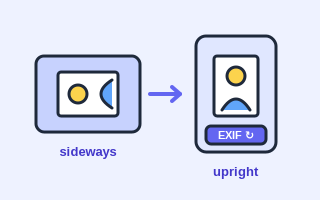
Cameras save a photo as the sensor saw it and add an EXIF tag, Orientation, with eight values from "normal" to "rotate 90 clockwise", saying which way is up. Programs that ignore the tag show the photo on its side. This converter reads it and puts every page the right way up.
Source: exiftool.org
Lay the page flat, hold the phone straight above it, and fill the screen with the page. Use daylight or a bright lamp rather than the flash, which leaves a glare. Clear photos make a PDF that is easy to read and print.
The number on each picture is its page. Drag pictures into place on a computer, or use the arrows on a phone, before you press Create PDF.
If a picture lies on its side, press its turn button (↻) until it is upright: each press turns it a quarter. The page size and orientation follow the turned picture.
Choose A4 for most of the world and US Letter for the United States and Canada, so the pages print without being shrunk or cut. Choose Fit picture for photo albums and slides.
None lets a photo fill the page. For documents you will print, a Small margin keeps text away from the edge that many printers can't reach.
If your browser can't read an iPhone's HEIC photos, open this page in Safari, or set the iPhone to Settings › Camera › Formats › Most Compatible so it takes JPGs.
Photos from phones are large. If the PDF is too big to attach, run it through Toolulu's PDF Compressor: it shrinks the pictures and keeps them clear.
Rename pictures.pdf to say what it is and whose it is, such as Passport form – A. Cruz.pdf, so the person who gets it knows at once.
Advertisements