Solve equations step by step: linear and quadratic (with the discriminant), higher degrees and systems; simplify, expand and factor expressions.
A simple online calculator: add, subtract, multiply, divide, percentages and brackets, with a history of your answers. Free, in your browser.
Derivatives (any order), indefinite and definite integrals, and limits, each checked numerically where it can be.
Solve equations and systems of equations, with the steps shown.
Add, subtract, multiply and divide fractions and mixed numbers, with the steps shown.
Graph functions and equations, and see their roots, intercepts and turning points.
Add and multiply matrices up to 6 × 6, and find the determinant, inverse, transpose, rank, row echelon form and eigenvalues, step by step.
Percentages of amounts, percentage increase and decrease, and what percent one number is of another.
Solve quadratic equations by the formula, with the roots and the steps shown.
Simplify ratios, solve proportions and scale amounts.
A free scientific calculator: sin, cos, tan and their inverses in degrees or radians, logarithms, powers, roots, factorials and constants.
Utilities
Utilities
Free QR codes for links, text, Wi-Fi, contacts, email, phone, SMS or a place on a map. Add your colours and logo, then download a PNG or SVG.
Read a QR code with your camera or from an image.
Pick a name at random from a list.
Pick random numbers in a range, with or without repeats.
PDF
PDF
Turn photos and images into a PDF, one image per page, in the order you choose.
Make PDF files smaller so they're easier to email and upload.
Add text, images and signatures to a PDF, and fill in its forms.
Combine several PDF files into one, in the order you choose.
Split a PDF into separate files, or take out the pages you need.
Turn each page of a PDF into a JPG image.
Turn a PDF into an editable Word document.
Turn a Word document into a PDF that looks the same everywhere.
Image
Image
Turn iPhone HEIC photos into JPG images that open anywhere.
Remove the background from a photo and keep the subject, for product photos and profile pictures.
Make JPG, PNG and WebP images smaller without losing visible quality.
Crop images freely or to a set aspect ratio.
Resize images to the width and height you need, or by percentage.
Turn JPG images into PNG.
Crop, rotate, adjust and add filters to photos in your browser.
Make passport and ID photos in the right size for your country, ready to print.
Turn PNG images into JPG.
Turn WebP images into JPG.
Language
Language
Check a text for grammar, spelling and punctuation mistakes.
Translate text between dozens of languages, from Filipino, Cebuano, Ilocano, Waray and Bikol to Latin. Up to 2,000 characters at a time.
Networking
Networking
See where a domain points: its DNS A records, free and instantly.
Measure your internet connection's download and upload speed and its ping.
Look up any IP address: its country, version and reverse DNS name.
Work out an IPv4 network's range, mask, broadcast and number of hosts.
Look up a domain's registrar, registration and expiry dates, or an IP address's owner and network.
Finance
Finance
How savings grow with compound interest and regular deposits.
Convert between 30 major currencies at today's European Central Bank reference rates.
The sale price and the amount saved from a price and a discount.
The return on an investment, in total and per year.
The monthly payment, total interest and payment schedule of a loan.
The monthly payment on a home loan from its price, down payment, rate and term.
Convert pay between hourly, daily, monthly and yearly.
Cybersecurity
Cybersecurity
Generate strong random passwords in your browser, from its secure random numbers.
Check a website's SSL/TLS certificate: who issued it, when it expires, its names, and the TLS version.
Text
Text
Count characters with and without spaces, for posts, ads and forms with limits.
Count the words, sentences and paragraphs in a text, with its reading time.
Date
Date
Your exact age in years, months and days from your birth date.
The time between two dates, or a date a number of days, weeks or months away.
Measurement
Measurement
Convert length, weight, temperature, volume, area, speed, data size and more, in your browser.
Audio
Audio
Take the audio out of a video as an MP3 file.
Turn speech into text as you talk.
Have a text read aloud in a natural voice, and choose the language and speed.
Health
Health
Body mass index from height and weight, in metric or imperial units.
Nutrition
Nutrition
How many calories you need a day to lose, keep or gain weight.
Time
Time
A stopwatch with lap times.
A countdown timer with an alarm, for cooking, study and workouts.
Convert a time between cities and time zones.
The time now in cities around the world.
Weather
Weather
Check the weather in any city, hour by hour, for today and the next 9 days: temperature, rain and the sky, from free national weather services.
Document Processing
Document Processing
Turn an Excel spreadsheet into a PDF.
Copy the text out of a photo, screenshot or scanned page.
Take the tables out of a PDF into an Excel spreadsheet.
Turn a PowerPoint presentation into a PDF.
Productivity
Productivity
A simple notepad that keeps your notes in your browser.
Work in focused 25-minute sessions with short breaks in between.
Measure your typing speed in words per minute, and your accuracy.
Career
Career
Write a resume from a clean template and download it as a PDF.
Business
Business
Make barcodes such as EAN-13, UPC and Code 128, and download them.
Make a professional invoice and download it as a PDF.
Video
Video
Make video files smaller to share and upload.
Education
Education
Your grade point average from your grades and credits.
Statistics
Statistics
The probability of single, combined and repeated events.
The standard deviation, variance and mean of a data set, with the steps shown.
Chemistry
Chemistry
Balance chemical equations, with the atoms counted on each side.
The molar mass of a compound from its chemical formula.
An interactive periodic table of all 118 elements: atomic weight, electron configuration, electronegativity and more, plus a molar mass calculator.
Physics
Physics
Solve common physics equations for motion, force, energy and electricity.
Construction
Construction
The concrete, blocks, bricks and other materials a building job needs.
Electrical Engineering
Electrical Engineering
Voltage, current, resistance and power: enter any two to get the others.
Programming
Programming
Decode Base64 back to text (UTF-8), in your browser.
Encode text as Base64 (UTF-8), in your browser.
Format, validate and minify JSON.
Test regular expressions against text, with the matches highlighted.
Convert Unix timestamps to dates and back.
Make random UUIDs (version 4), one or many at a time.
Graphic Design
Graphic Design
Pick a color and get its HEX, RGB and HSL values.
Convert colors between RGB and HEX.
Computer Science
Computer Science
Convert numbers between binary, octal, decimal, hexadecimal and any base from 2 to 36, with fractions, Roman numerals and the number in words.
Database
Database
Format SQL queries so they're easy to read.
Music
Music
Tune your guitar with your device's microphone.
A metronome with tempo, time signature and accents.
Play the piano with your mouse, touch screen or keyboard.
Digital Electronics
Digital Electronics
Simplify Boolean expressions step by step, naming each law (De Morgan, absorption…), with the truth table, minimal SOP and POS, or check two are equal.
Simplify Boolean functions with a Karnaugh map: click cells or type minterms and don't-cares, and get the minimal SOP and POS for 2 to 6 variables.
Electronics Engineering
Electronics Engineering
Build simple electronic circuits on screen and see the voltages and currents.
Popular
About the QR Code Generator
A free QR code generator: make a code for a link, plain text, a Wi-Fi network, a contact card, an email, a phone number, a text message or a place on a map, and download it as a PNG or SVG for print or screen. Choose the colours and the error correction level, and add your logo in the middle. The code is made in your browser: nothing you type is sent anywhere.
How to use it
Pick what the code holds (Link, Text, Wi-Fi, Contact, Email, Phone, SMS or Location) and fill in its fields: the code appears as you type.
Choose the error correction level, the colours and a logo, if you like; a warning shows when the code may be hard to scan.
Download it as a PNG (256 to 2048 pixels) or an SVG, scan it with your phone to check, then print or share it.
Questions
Do these QR codes expire?
No. Everything is in the pattern itself, so the code works for as long as it can be seen. A code that holds a web address only stops being useful if that address is taken down or changed.
How do I make a QR code for my Wi-Fi?
Choose Wi-Fi, type the network name and password exactly as they are, and pick the security type (WPA for almost every home and office network today). Phones that scan it offer to join the network, with no typing.
PNG or SVG: which should I download?
PNG for screens, documents and most printing: choose 1024 or 2048 pixels for print. SVG for posters, signs and print shops: it stays sharp at any size.
Can I put a logo in the middle?
Often, because error correction can make up for a small covered area. Choose level H, keep the logo small and away from the three corner squares, and test the code on more than one phone before printing.
Is a QR code safe to scan?
The code is only data, but it can lead to any website. Check the address your phone shows before you open it, especially on codes stuck up in public places.
Did you know?
Made for car factories, not phones
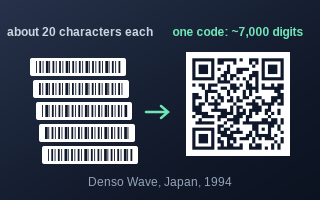
The QR code was made in 1994 by DENSO WAVE, then a division of the Japanese car parts maker Denso, for its factories. A barcode holds only about 20 characters, so workers were scanning around a thousand of them a day. Masahiro Hara and one colleague spent a year and a half on a square code that could hold about 7,000 digits, and Japanese characters too.
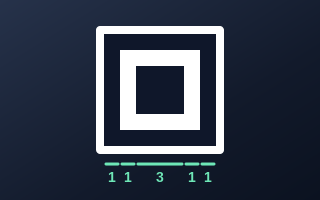
A scanner finds a QR code by its three corner squares, so they had to look like nothing else on a page. The team reduced leaflets, magazines and cardboard boxes to black and white and measured the bands, day after day, to find the ratio printed matter uses least. It was 1:1:3:1:1: dark, light, a dark band three times as wide, light, dark. That ratio is why a code reads from any angle.
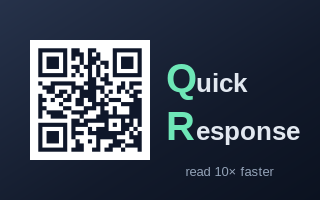
Other two-dimensional codes of the time tried to pack in as much as possible. Hara's aim was speed, and the name says so: QR stands for Quick Response. Thanks to the corner squares, the new code could be read more than ten times faster than other codes.
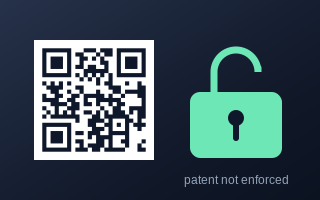
DENSO WAVE holds patents on the QR code but decided from the start not to use them against anyone following the standard, and published the specification. Anyone can make and print QR codes without paying or asking, which is a big part of why they are now everywhere.
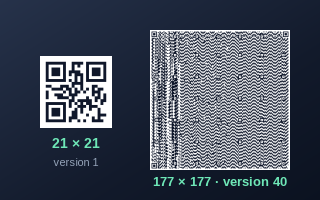
The smallest QR code, version 1, is 21 by 21 squares (modules). Each version adds 4 modules a side, up to version 40 at 177 by 177, which holds up to 7,089 digits, or 2,953 bytes of text. This generator picks the smallest version your text fits in, and shows it under the code.
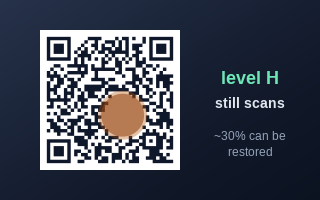
Factory labels get oily and torn, so QR codes carry Reed-Solomon error correction, the same kind of maths used on music CDs and for spacecraft signals. At level L about 7% of the code can be restored, at M 15%, at Q 25% and at H 30%. The code in the picture, at level H, still reads with its stain.
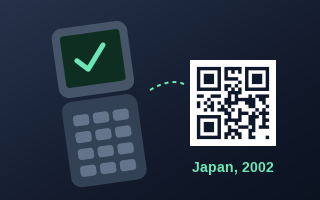
For its first years the QR code tracked car parts, food and medicines. In 2002 Japanese mobile phones began to read QR codes with their cameras, and people started scanning them for websites and coupons. It became an ISO international standard in 2000, and is now on tickets, boarding passes and menus around the world.
Print a Wi-Fi code for the fridge door, a guest room or a café table. Guests scan it and their phone offers to join, so nobody spells out a long password, and you can keep it long and strong.
Create a digital business card
Put a Contact code on the back of your business card, a name badge or your email signature. One scan saves your name, phone, email and website straight into the other person's contacts.
Turn printed menus into digital ones
A code on each table links to your menu online, which you can change any day without reprinting: prices, specials, allergens and photos. Keep a few printed menus for people who prefer paper.
Create interactive wedding invitations
Add a small code to an invitation or save-the-date that links to the RSVP form, the venue's map or a shared album where guests can upload their photos after the day.
Make classroom materials interactive
Stick codes on worksheets that reveal the answer, a hint or a short video once a pupil has tried, or hide Text codes around the room as clues for a scavenger hunt: no internet needed to read them.
Create your own inventory labels
Label storage boxes, toolboxes or the freezer with a Text code listing what's inside. When you move house or look for something, scan the box instead of opening it. Text codes work without any website.
Share a location without typing an address
For a party, a market stall or a meeting point, a Location code opens the place on a map, ready for directions. It works with a place name, a street address or exact coordinates for a spot with no address.
Create a pre-filled email or text message
An Email or SMS code opens a message already addressed and written: "Book a table for Friday", "Count me in", "Send me the brochure". People only have to press Send.
Customise it with your colours and logo
Use your brand's colour for the code and add your logo in the middle (Logo, under the fields: level H is chosen for you). Keep the code dark on a light background, and scan it with a couple of phones before printing.
Experiment with error correction
Switch between L, M, Q and H and watch the code change: each step up adds more squares, so it can still be read when part of it is dirty, scratched or covered. L makes the smallest code; H the toughest.