Solve equations step by step: linear and quadratic (with the discriminant), higher degrees and systems; simplify, expand and factor expressions.
A simple online calculator: add, subtract, multiply, divide, percentages and brackets, with a history of your answers. Free, in your browser.
Derivatives (any order), indefinite and definite integrals, and limits, each checked numerically where it can be.
Solve equations and systems of equations, with the steps shown.
Add, subtract, multiply and divide fractions and mixed numbers, with the steps shown.
Graph functions and equations, and see their roots, intercepts and turning points.
Add and multiply matrices up to 6 × 6, and find the determinant, inverse, transpose, rank, row echelon form and eigenvalues, step by step.
Percentages of amounts, percentage increase and decrease, and what percent one number is of another.
Solve quadratic equations by the formula, with the roots and the steps shown.
Simplify ratios, solve proportions and scale amounts.
A free scientific calculator: trig in degrees or radians, logs, powers and roots, and a Programmer mode for binary, hex, octal and bitwise logic.
Utilities
Utilities
Free QR codes for links, text, Wi-Fi, contacts, email, phone, SMS or a place on a map. Add your colours and logo, then download a PNG or SVG.
Read a QR code with your camera or from an image.
Pick a name at random from a list.
Pick random numbers in a range, with or without repeats.
PDF
PDF
Turn photos into one PDF: put pages in order, turn them, choose A4, Letter or the photo's shape. Free; your pictures never leave your computer.
Make a PDF smaller to email or upload: photos and scans shrink, text stays sharp. Free, and the file never leaves your computer.
Add text, images and signatures to a PDF, and fill in its forms.
Combine several PDF files into one, in the order you choose.
Split a PDF into separate files, or take out the pages you need.
Turn each page of a PDF into a JPG image.
Turn a PDF into a Word file you can edit: paragraphs, headings, bold and italic kept. Free, and your PDF never leaves your computer.
Turn a Word document into a PDF that looks the same everywhere.
Image
Image
Turn iPhone HEIC photos into JPG images that open anywhere.
Remove the background from a photo in seconds: a transparent PNG, or white or any colour. Free, and your photo never leaves your device.
Make JPG, PNG and WebP images smaller without losing visible quality.
Crop images freely or to a set aspect ratio.
Resize images to the width and height you need, or by percentage.
Turn JPG images into PNG.
Crop, rotate, adjust and add filters to photos in your browser.
Make passport and ID photos in the right size for your country, ready to print.
Turn PNG images into JPG.
Turn WebP images into JPG.
Language
Language
Check a text for grammar, spelling and punctuation mistakes.
Translate between dozens of languages, with all the Philippine languages at once in the Philippines, English letters for other scripts, and Listen.
Write words in another alphabet without translating them: Russian, Greek, Arabic, Korean, Japanese, Hindi or Baybayin to English letters, and back.
Networking
Networking
See where a domain points: its DNS A records, free and instantly.
Test your internet speed free: download, upload, ping and jitter, on the nearest Measurement Lab server, and see what your connection is good for.
Look up any IP address: its country, version and reverse DNS name.
Work out an IPv4 network's range, mask, broadcast and number of hosts.
Look up a domain's registrar, registration and expiry dates, or an IP address's owner and network.
Finance
Finance
How savings grow with compound interest and regular deposits.
Convert between 30 major currencies at today's European Central Bank reference rates.
The sale price and the amount saved from a price and a discount.
The return on an investment, in total and per year.
The monthly payment, total interest and payment schedule of a loan.
The monthly payment on a home loan from its price, down payment, rate and term.
Convert pay between hourly, daily, monthly and yearly.
Cybersecurity
Cybersecurity
Generate strong random passwords in your browser, from its secure random numbers.
Check a website's SSL/TLS certificate: who issued it, when it expires, its names, and the TLS version.
Text
Text
Count characters with and without spaces, for posts, ads and forms with limits.
Count the words, sentences and paragraphs in a text, with its reading time.
Date
Date
Your exact age in years, months and days from your birth date.
The time between two dates, or a date a number of days, weeks or months away.
Measurement
Measurement
Convert length, weight, temperature, volume, area, speed, data size and more, in your browser.
Audio
Audio
Take the audio out of a video as an MP3 file.
Turn speech into text as you talk.
Have a text read aloud in a natural voice, and choose the language and speed.
Health
Health
Body mass index from height and weight, in metric or imperial units.
Nutrition
Nutrition
How many calories you need a day to lose, keep or gain weight.
Time
Time
A stopwatch with lap times.
A countdown timer with an alarm, for cooking, study and workouts.
Convert a time between cities and time zones.
The time now in cities around the world.
Weather
Weather
Check the weather in any city, hour by hour, for today and the next 9 days: temperature, rain and the sky, from free national weather services.
Document Processing
Document Processing
Turn an Excel spreadsheet into a PDF.
Copy the text out of a photo, screenshot or scanned page.
Take the tables out of a PDF into an Excel spreadsheet.
Turn a PowerPoint presentation into a PDF.
Productivity
Productivity
A simple notepad that keeps your notes in your browser.
Work in focused 25-minute sessions with short breaks in between.
Measure your typing speed in words per minute, and your accuracy.
Career
Career
Write a resume from a clean template and download it as a PDF.
Business
Business
Make barcodes such as EAN-13, UPC and Code 128, and download them.
Make a professional invoice and download it as a PDF.
Video
Video
Make video files smaller to share and upload.
Education
Education
Your grade point average from your grades and credits.
Statistics
Statistics
The probability of single, combined and repeated events.
The standard deviation, variance and mean of a data set, with the steps shown.
Chemistry
Chemistry
Balance chemical equations, with the atoms counted on each side.
The molar mass of a compound from its chemical formula.
An interactive periodic table of all 118 elements: atomic weight, electron configuration, electronegativity and more, plus a molar mass calculator.
Physics
Physics
Solve common physics equations for motion, force, energy and electricity.
Construction
Construction
The concrete, blocks, bricks and other materials a building job needs.
Electrical Engineering
Electrical Engineering
Voltage, current, resistance and power: enter any two to get the others.
Programming
Programming
Decode Base64 back to text (UTF-8), in your browser.
Encode text as Base64 (UTF-8), in your browser.
Format, validate and minify JSON.
Test regular expressions against text, with the matches highlighted.
Convert Unix timestamps to dates and back.
Make random UUIDs (version 4), one or many at a time.
Graphic Design
Graphic Design
Pick a color and get its HEX, RGB and HSL values.
Convert colors between RGB and HEX.
Computer Science
Computer Science
Convert numbers between binary, octal, decimal, hexadecimal and any base from 2 to 36, with fractions, Roman numerals and the number in words.
Database
Database
Format SQL queries so they're easy to read.
Music
Music
Tune your guitar with your device's microphone.
A metronome with tempo, time signature and accents.
Play the piano with your mouse, touch screen or keyboard.
Digital Electronics
Digital Electronics
Simplify Boolean expressions step by step, naming each law (De Morgan, absorption…), with the truth table, minimal SOP and POS, or check two are equal.
Simplify Boolean functions with a Karnaugh map: click cells or type minterms and don't-cares, and get the minimal SOP and POS for 2 to 6 variables.
Electronics Engineering
Electronics Engineering
Build simple electronic circuits on screen and see the voltages and currents.
About the Image Background Remover
A free image background remover that cuts the subject out of a photo: a person, a product, a pet or a car. Keep the background transparent, or put the subject on white or any colour, ready for shop listings, profile pictures and designs. It all happens in your browser: the photo is never uploaded, so it stays private.
How to use it
Drop a photo on the box, or choose one: JPG, PNG or WebP, up to 50 MB.
Wait a few seconds while the background is removed. The first time, the tool loads its 44 MB model; after that it starts at once.
Pick a background, drag the handle to compare before and after, then download a PNG (transparent) or a JPG.
Questions
Is my photo uploaded anywhere?
No. The background is removed in your browser, on your own device. Your photo is never sent to Toolulu or anyone else.
Which photos work best?
Photos with a clear subject in front: people, products, pets, cars. A busy scene where nothing stands out, or a subject the same colour as its background, is harder. Everything in the foreground is kept, so two people standing together both stay.
Why does it load 44 MB the first time?
That is the AI model that finds the subject (ISNet). Your browser loads it once and keeps it, so later photos start at once, and nothing about your photo is sent anywhere.
PNG or JPG?
PNG keeps the background transparent, for designs and slides. JPG can't be transparent, so it is offered once you pick a background colour; it makes a smaller file, good for shop listings.
Does it keep my photo's size?
Yes, up to 6,000 pixels on the longest side. The model finds the subject on a smaller copy, and the cut is laid over your full-size photo.
Can I fix the edges by hand?
Not yet: the cut-out is automatic, with soft edges. For fine retouching, open the PNG in a photo editor.
Did you know?
Where the "alpha" channel came from
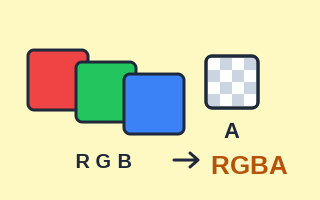
Ed Catmull and Alvy Ray Smith came up with the alpha channel at New York Tech in the 1970s. It stores how see-through each pixel is, as a fourth channel next to red, green and blue: RGB became RGBA, the format a cut-out with a transparent background is saved in.
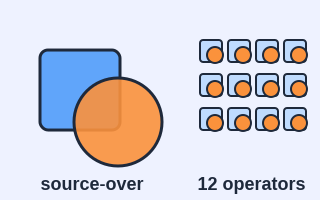
In 1984 Thomas Porter and Tom Duff, working at Lucasfilm, wrote the maths for layering images with transparent parts and defined 12 basic operators. Web browsers still use them: putting one image over another is their "source-over".
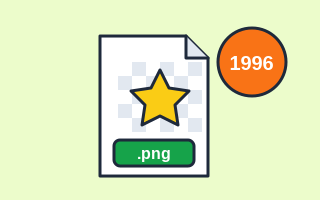
PNG became a W3C Recommendation on 1 October 1996. One of its new features, which GIF didn't have, was a full alpha channel: each pixel can be partly see-through, which is why cut-outs are saved as PNG.
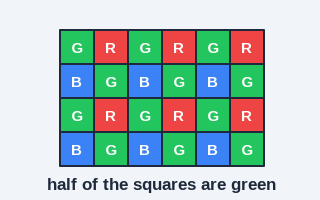
In the colour filter Bryce Bayer designed at Kodak, patented in 1976, green-sensing elements take every other position, half the sensor; red and blue fill the rest. Most digital cameras still use this pattern.
The ISNet model this tool uses was trained on DIS5K: 5,470 high-resolution photos (2K, 4K or larger) of hidden, eye-catching and very intricate objects, each labelled in extremely fine detail.
Filmmakers lift a subject off a plain backdrop of one colour. That backdrop was so often blue that the trick is called blue screen matting, though yellow and, more and more, green are used too.
The tool finds what is in front. A subject that stands apart from a plain or blurred background, in a different colour, comes out cleanest.
Use soft, even light
Daylight by a window or a bright lamp from the front works best. Hard shadows behind the subject can be mistaken for part of it.
Start from a large photo
The cut-out keeps your photo's size, so a large, sharp photo gives a large, sharp cut-out. Avoid screenshots and photos that were already shrunk.
Check hair and fine edges
Drag the handle to compare before and after, and look closely at hair, fur and see-through parts. Edges are kept soft, so they blend into a new background.
White for shop listings
Many online shops ask for product photos on plain white. Pick the white swatch and download a JPG: a smaller file that uploads quickly.
PNG keeps it transparent
For logos, slides and designs, keep the background transparent and download a PNG. A JPG can't be see-through: it always has a background.
Group photos stay together
Everything in the foreground is kept: two people, or a person with a car, stay together. To keep just one, crop the photo around them first.
Give it a new background
Pick any colour for a clean profile picture, or download the transparent PNG and place it on a new scene in Canva, PowerPoint or a photo editor.